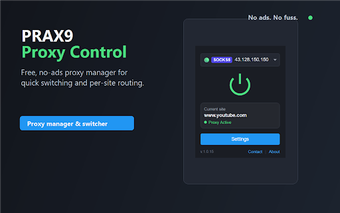
PRAX9 - Proxy Control: Lightweight proxy manager for Chrome
PRAX9 - Proxy Control, from Lamama, is a Chrome extension that simplifies in-browser proxy management for development and testing tasks. It provides quick proxy switching with local configuration storage and built-in health checks to avoid routing through non-responsive endpoints. The extension emphasises minimal UI, routing flexibility, and bulk import support while handling both HTTP and SOCKS5 protocols. It is aimed at developers, testers, SEO professionals, and privacy-minded users who rotate proxies frequently.
What is PRAX9 used for?
PRAX9 is a browser-based proxy manager intended to make frequent proxy rotation straightforward. The extension offers one-click connect and disconnect controls and an auto-pick option that chooses a working proxy from your saved list. It supports authenticated connections and visually tags proxy locations with country flags. Supported import formats include:
- Plain text
- CSV
- JSON
How does PRAX9 handle privacy and storage?
The extension stores proxy lists and credentials locally and the developer states that no data is collected externally. That local-only model keeps configuration and authentication details on the device rather than syncing them out to a service. The interface is ad-free, and built-in health checks test saved proxies for response times and availability so active routes avoid dead servers.
How well does PRAX9 perform in everyday browsing workflows?
PRAX9 is presented as a lightweight tool intended to use fewer resources than larger proxy managers and to behave well inside Chromium-based browsers. It is available for Chrome and other Chromium-based browsers such as Microsoft Edge, Brave, and Opera. Integrated health checks and the auto-pick feature improve reliability during heavy rotation, and early user feedback highlights perceived speed and simplicity compared with more cluttered alternatives.
PRAX9 suits in-browser proxy workflows but is limited to the browser scope
PRAX9 is a practical choice for users who need compact, privacy-aware proxy control inside their browser, because configuration stays local and the UI avoids advertising. A clear trade-off is that it operates only as a browser extension, so it cannot proxy traffic from other applications or provide system-wide routing. Users requiring OS-level proxying should consider a different solution.